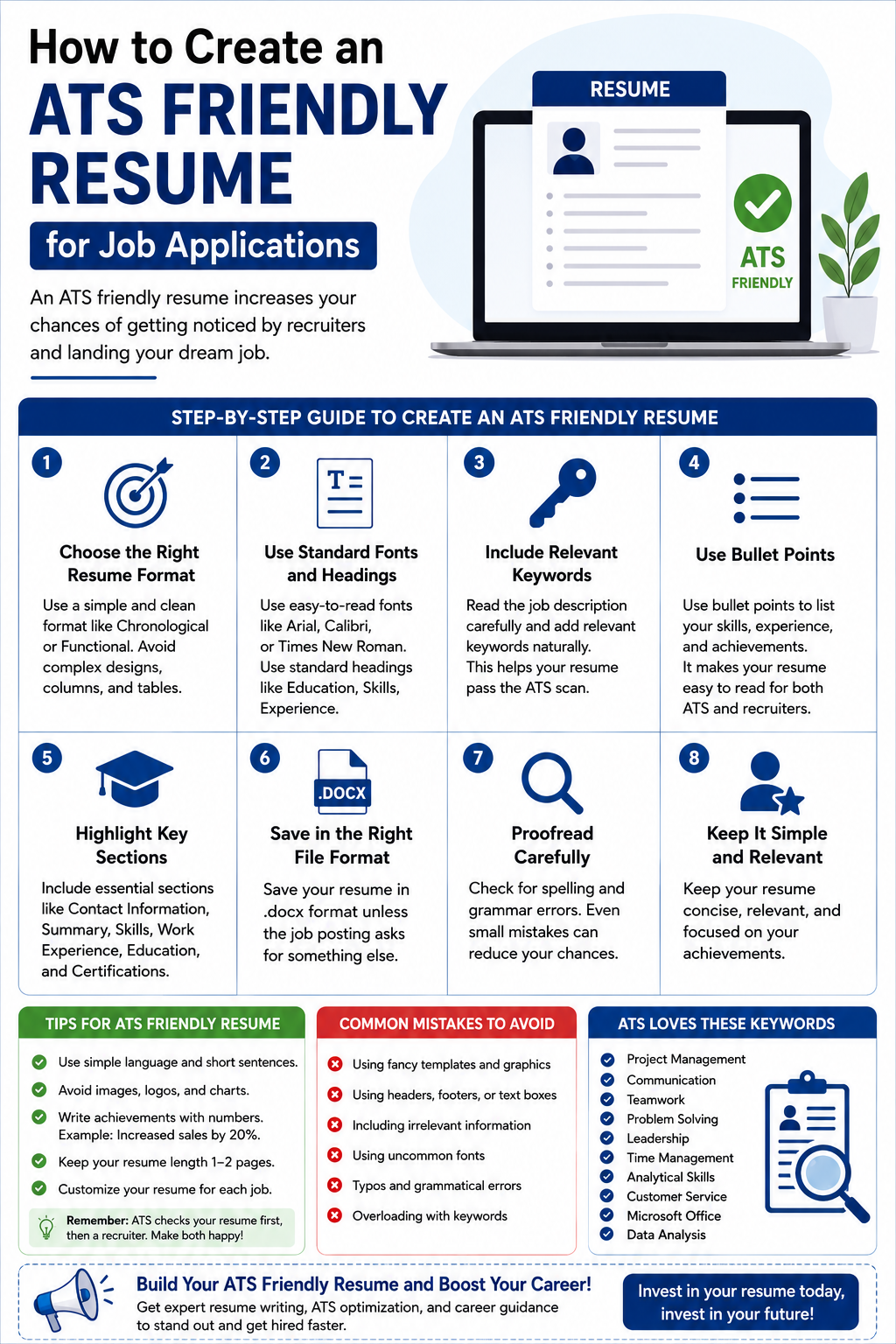
In today’s competitive hiring market, knowing how to create an ATS friendly resume for job applications can make a huge difference in your career journey. Whether you are a fresher searching for your first role, a student applying for internships, or a professional planning a career switch, your resume must pass through Applicant Tracking Systems (ATS) before it reaches a recruiter. That’s where Lynxperio helps job seekers build smarter resumes that improve visibility and increase interview opportunities.
Many candidates have strong qualifications but still fail to get interview calls because their resumes are not optimized for ATS software. Recruiters today receive hundreds of applications for a single job opening. As a result, companies rely on ATS tools to scan, sort, and shortlist resumes based on keywords, formatting, and relevance.
The good news is that creating an ATS-friendly resume is not difficult when you understand the right strategy. In this detailed guide, you will learn everything about creating a resume that works for both recruiters and ATS software.
What Is an ATS Friendly Resume?
An ATS friendly resume for job applications is a resume designed in a format that Applicant Tracking Systems can easily read and understand. ATS software scans resumes for specific keywords, skills, education, work experience, and formatting.
If your resume contains complicated layouts, graphics, tables, or missing keywords, the ATS may reject it automatically — even if you are highly qualified.
An ATS-friendly resume focuses on:
- Clear formatting
- Relevant keywords
- Proper section headings
- Readable fonts
- Simple structure
- Job-specific optimization
In simple words, your resume should be easy for both software and human recruiters to read.
Why ATS Optimization Matters Today
Modern hiring has become more technology-driven than ever before. According to industry reports, most medium and large companies now use ATS software to filter candidates.
That means your resume must first impress a machine before a human recruiter sees it.
Here’s why ATS optimization matters:
Higher Chances of Resume Shortlisting
An optimized resume increases your chances of passing ATS scans and getting shortlisted.
Better Keyword Matching
ATS systems search for keywords related to skills, qualifications, and job roles.
Faster Recruiter Visibility
Recruiters can quickly identify relevant candidates when resumes are properly formatted.
Increased Interview Opportunities
A well-optimized ATS friendly resume for job applications can directly improve your interview call rate. At Lynxperio career experts often recommend tailoring every resume according to the job description to maximize ATS performance.
How to Create an ATS Friendly Resume for Job Applications
Creating an ATS optimized resume requires strategy, structure, and attention to detail. Let’s break the process down step by step.
1. Choose the Right Resume Format
The format of your resume plays a major role in ATS readability.
The best formats include:
- Reverse chronological resume
- Hybrid resume format
- Simple professional layout
Avoid:
- Infographics
- Multi-column layouts
- Fancy designs
- Text inside images
- Complex tables
A clean and professional structure works best.
2. Use Standard Resume Headings
ATS systems recognize common resume section titles.
Use headings like:
- Professional Summary
- Skills
- Work Experience
- Education
- Certifications
- Projects
- Achievements
Avoid creative headings such as:
- My Journey
- Career Snapshot
- Things I’ve Done
Simple and standard headings improve ATS compatibility.
3. Add Relevant Keywords Naturally
Keywords are one of the most important elements of an ATS friendly resume for job applications.
Recruiters often include important skills and qualifications in job descriptions. ATS software scans resumes for these exact terms.
For example, if the job description mentions:
- Project management
- Data analysis
- SEO strategy
- Digital marketing
Your resume should naturally include those phrases if you possess those skills.
However, avoid keyword stuffing. Instead, place keywords naturally inside:
- Skills section
- Work experience
- Summary
- Certifications
Lynxperio recommends customizing your resume for every application rather than using the same resume everywhere.
4. Write a Strong Professional Summary
Your professional summary is the first section recruiters read.
Keep it concise, relevant, and keyword-rich.
Example:
“Results-driven digital marketing professional with 3+ years of experience in SEO, content strategy, social media marketing, and campaign optimization. Skilled in analytics, keyword research, and performance marketing.”
This type of summary improves ATS relevance while also engaging recruiters.
5. Focus on Skills That Match the Job
The skills section should align with the target role.
Use a mix of:
Technical Skills
- SEO
- Python
- Excel
- Data Analytics
- Graphic Design
- CRM Tools
Soft Skills
- Communication
- Leadership
- Problem-solving
- Team collaboration
- Time management
Always prioritize skills mentioned in the job description.
Best ATS Resume Keywords to Include
Using semantic SEO keywords naturally throughout your resume improves ATS matching.
Here are some examples:
Freshers
- Internship experience
- Academic projects
- Communication skills
- Teamwork
- Problem-solving
IT Professionals
- Software development
- Cloud computing
- SQL
- Java
- Cybersecurity
Marketing Professionals
- Content marketing
- Search engine optimization
- Social media management
- PPC campaigns
- Google Analytics
Management Roles
- Team leadership
- Business strategy
- Operations management
- Stakeholder communication
- Project coordination
Lynxperio also suggests reviewing multiple job descriptions in your field to identify recurring keywords.
ATS Friendly Resume Formatting Tips
Formatting mistakes can confuse ATS systems and reduce your chances of selection.
Here are important formatting tips to follow.
Use Simple Fonts
Best fonts include:
- Arial
- Calibri
- Helvetica
- Times New Roman
Keep font size between 10 and 12.
Save Resume in the Right File Format
Most ATS systems accept:
- DOCX
Always check the job posting instructions before uploading.
Avoid Headers and Footers
Some ATS software cannot properly read information inside headers and footers.
Keep important details in the main body.
Use Bullet Points
Bullet points improve readability for both ATS systems and recruiters.
Keep the Layout Clean
Use enough spacing and avoid clutter.
A clean resume looks more professional and performs better.
Common Mistakes to Avoid in an ATS Friendly Resume for Job Applications
Even highly qualified candidates make simple resume mistakes.
Here are the most common ones.
Using Fancy Designs
Creative designs may look attractive but often fail ATS scans.
Keyword Stuffing
Adding excessive keywords unnaturally can hurt readability.
Using Images or Icons
ATS systems usually cannot read images properly.
Applying with the Same Resume Everywhere
Every job description is different.
Customize your resume for every application.
Ignoring Spelling Errors
Typos and grammar mistakes create a negative impression.
Always proofread your resume carefully.
Missing Contact Information
Include:
- Full name
- Phone number
- Professional email address
- LinkedIn profile
Lynxperio advises candidates to double-check all details before submitting applications.
ATS Friendly Resume Example Structure
Here’s a simple ATS-friendly resume structure:
Header
- Name
- Phone number
- LinkedIn profile
Professional Summary
2–3 lines highlighting experience and key skills.
Skills
Relevant technical and soft skills.
Work Experience
Include:
- Job title
- Company name
- Dates
- Key achievements
Education
- Degree
- University name
- Graduation year
Certifications
Add relevant certifications.
Projects
Especially useful for freshers and students.
This format works well for most industries.
Tips to Make Your Resume Stand Out Beyond ATS
Passing ATS is only the first step.
Your resume must also impress recruiters.
Quantify Achievements
Use numbers whenever possible.
Example:
“Increased website traffic by 45% through SEO optimization.”
Keep It Concise
Ideally:
- Freshers: 1 page
- Experienced professionals: 1–2 pages
Use Action Verbs
Strong action words create impact.
Examples include:
- Managed
- Developed
- Created
- Led
- Improved
- Implemented
Add Relevant Certifications
Certifications increase credibility.
Include LinkedIn Profile
A professional LinkedIn profile strengthens your application.
Lynxperio helps professionals optimize both resumes and LinkedIn profiles for better career visibility.
How Freshers Can Create an ATS Friendly Resume
Freshers often worry about limited work experience. However, an ATS friendly resume for job applications can still be highly effective.
Focus on:
- Academic projects
- Internships
- Certifications
- Technical skills
- Volunteer work
- Leadership activities
Fresher Resume Example Achievement
“Led a university marketing project that increased event registrations by 30%.”
Even academic experiences can showcase valuable skills.
How Professionals Can Improve ATS Resume Scores
Experienced professionals should focus on measurable achievements and industry-specific keywords.
For example:
Instead of writing:
“Responsible for sales.”
Write:
“Generated 25% annual revenue growth through strategic client acquisition.”
This creates stronger recruiter impact while improving ATS relevance.
At Lynxperio, resume experts often recommend updating resumes every six months to keep them aligned with changing industry trends.
Why Tailoring Your Resume Is Important
One generic resume cannot fit every job application.
Tailored resumes perform significantly better because they:
- Match job descriptions closely
- Improve ATS keyword relevance
- Show recruiters genuine interest
- Increase interview chances
Before applying:
- Read the job description carefully
- Highlight important keywords
- Customize your summary and skills
- Align achievements with job requirements
This small effort can produce major results.
FAQs About ATS Friendly Resume for Job Applications
What is an ATS friendly resume for job applications?
An ATS friendly resume for job applications is a resume optimized for Applicant Tracking Systems using proper formatting, keywords, and structure.
Which resume format is best for ATS?
Reverse chronological and hybrid resume formats are considered best for ATS compatibility.
Can ATS read PDF resumes?
Yes, most modern ATS systems can read PDFs, but always follow the job posting instructions.
How many keywords should I include in my resume?
Include relevant keywords naturally throughout your resume without overstuffing.
Are graphics and icons ATS friendly?
No, graphics, icons, and complex visuals can confuse ATS software.
How often should I update my resume?
You should update your resume regularly, especially when you gain new skills, certifications, or work experience.
Conclusion
Understanding how to create an ATS friendly resume for job applications is one of the most valuable career skills in today’s competitive job market. A strong ATS resume increases your chances of getting shortlisted, improves recruiter visibility, and helps you secure more interview opportunities.
From choosing the right format and using relevant keywords to avoiding formatting mistakes and tailoring applications, every detail matters. Most importantly, your resume should remain clear, professional, and achievement-focused.
If you want expert support in building a professional ATS-optimized resume, improving your LinkedIn profile, or enhancing your career strategy, explore Lynxperio today. Lynxperio offers practical resume and career solutions designed to help students, freshers, and professionals stand out in a competitive hiring environment.
Start building a resume that gets noticed — and gets results.
I’ve created the full SEO-friendly, 1200+ word blog article optimized around the focus topic “How to Create an ATS Friendly Resume for Job Applications,” including

The emphasis on how formatting constraints can inadvertently block qualified candidates from recruiter view is a crucial point many job seekers overlook. It is refreshing to see a guide that not only explains the ‘how’ but also reinforces why keyword relevance and simple layouts are the backbone of modern application strategies. This breakdown really clarifies why standard formatting often fails against automated screening tools.