Creating a professional resume is no longer enough in today’s competitive job market. Before your resume reaches a recruiter, it often passes through an Applicant Tracking System (ATS). At Lynxperio, we’ve seen many qualified candidates get rejected simply because their resumes were not ATS-friendly. That’s why using the best ATS resume checker free tools compared in this guide can significantly improve your chances of getting shortlisted.
Whether you are a fresher, student, job seeker, or experienced professional, ATS resume checker tools help identify formatting issues, missing keywords, readability problems, and compatibility errors that could hurt your applications.
In this detailed guide, we’ll compare the best free ATS resume checker tools, explain how ATS systems work, discuss their pros and cons, share practical resume optimization tips, and help you choose the right tool for your career goals.
What Is an ATS Resume Checker?
An ATS resume checker is an online tool that analyzes your resume to determine how well it performs with Applicant Tracking Systems.
These tools scan resumes for:
- Keyword optimization
- Formatting issues
- ATS compatibility
- Resume readability
- Skills matching
- Resume structure
Many companies use ATS software to filter resumes before recruiters manually review applications.
If your resume is not optimized properly, it may never reach the hiring manager.
That’s why understanding the best ATS resume checker free tools compared can help improve your job application success.
Why ATS Optimization Matters
Modern companies receive hundreds of applications for a single job opening.
ATS systems help recruiters filter candidates quickly based on:
- Skills
- Keywords
- Experience
- Education
- Resume structure
An ATS-friendly resume improves your chances of:
- Passing automated screening
- Increasing resume visibility
- Getting interview calls
- Matching job descriptions
- Improving recruiter readability
At Lynxperio, career experts often recommend ATS optimization for both freshers and experienced professionals because even strong candidates can get rejected due to poor formatting.
How ATS Resume Checker Tools Work
ATS checker tools compare your resume against job descriptions and hiring standards.
They analyze factors such as:
- Keyword matching
- Resume formatting
- Section organization
- Readability
- File compatibility
- Contact information structure
Most tools provide:
- ATS score
- Suggestions
- Keyword recommendations
- Formatting improvements
- Resume optimization tips
Using these insights can make your resume more recruiter-friendly.
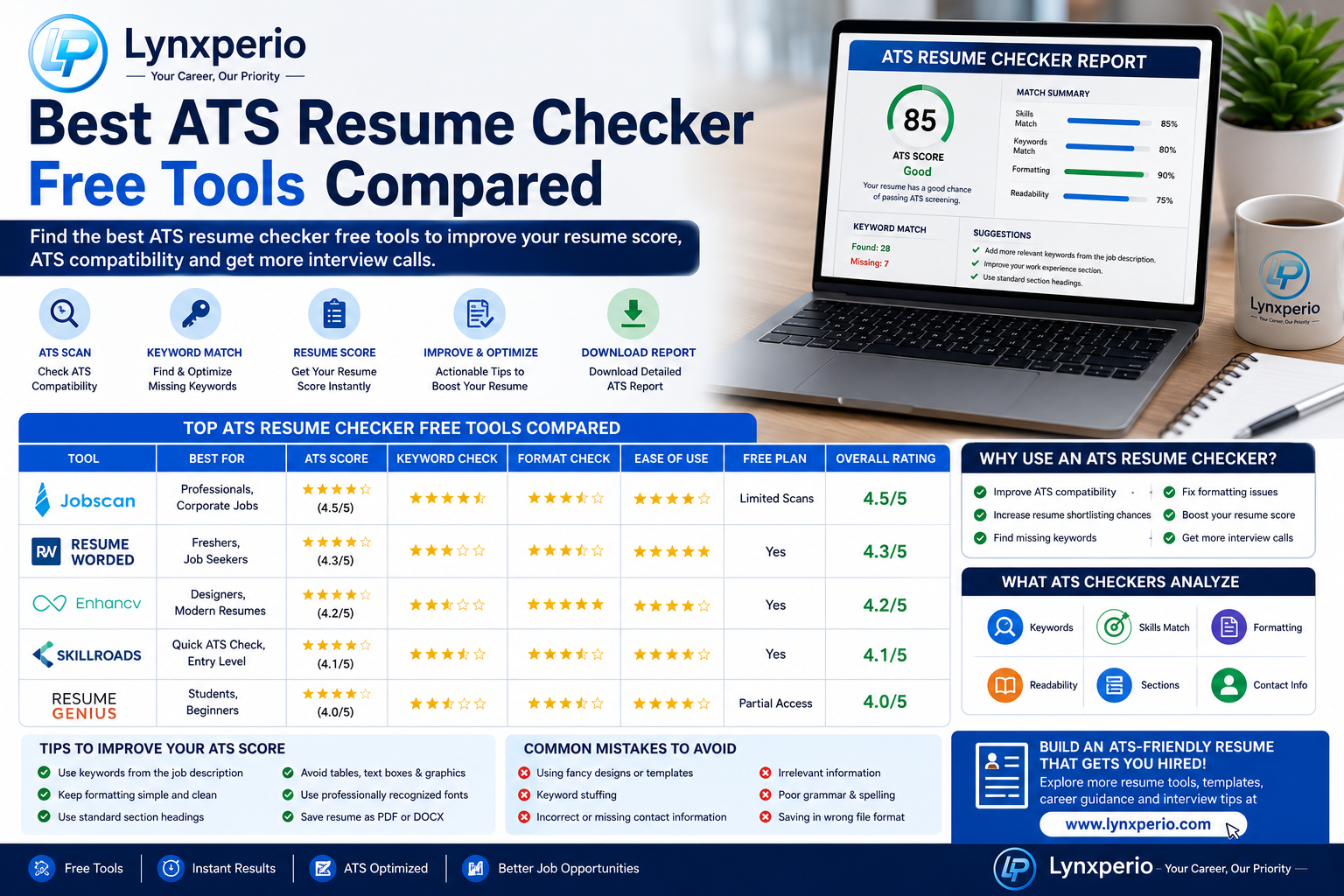
Best ATS Resume Checker Free Tools Compared
Let’s compare some of the most popular free ATS resume checker tools available today.
1. Jobscan
Jobscan is one of the most well-known ATS resume optimization platforms.
Features:
- ATS compatibility scoring
- Keyword analysis
- Resume matching
- Skills comparison
- LinkedIn optimization
Pros:
- Excellent keyword suggestions
- Easy-to-understand scoring
- Helpful ATS insights
Cons:
- Limited free scans
- Premium features require payment
Best For:
- Professionals applying for corporate jobs
- ATS keyword optimization
2. Resume Worded
Worded provides resume feedback powered by AI analysis.
Features:
- Resume scoring
- LinkedIn profile review
- Keyword optimization
- Resume improvement tips
Pros:
- Beginner-friendly interface
- Actionable recommendations
- Strong formatting suggestions
Cons:
- Some advanced tools are premium
Best For:
- Freshers and students
- LinkedIn profile optimization
3. Enhancv Resume Checker
Enhancv offers free ATS resume analysis with modern resume insights.
Features:
- ATS checks
- Resume content suggestions
- Layout analysis
- Resume readability feedback
Pros:
- Modern interface
- Fast analysis
- Useful content recommendations
Cons:
- Limited detailed reports in free version
Best For:
- Creative professionals
- Resume formatting improvements
4. Skillroads ATS Resume Checker
focuses on ATS compatibility and resume optimization.
Features:
- ATS analysis
- Resume score
- Keyword recommendations
- Formatting evaluation
Pros:
- Simple user experience
- Quick resume checks
Cons:
- Limited advanced customization
Best For:
- Quick ATS checks
- Entry-level job seekers
5. Resume Genius Resume Checker
Genius provides resume review tools and templates.
Features:
- Resume builder
- ATS-friendly templates
- Resume writing guidance
Pros:
- Easy-to-use platform
- Professional templates
Cons:
- Some features locked behind subscription
Best For:
- Freshers and beginners
- Resume formatting support
Comparison Table of ATS Resume Checker Tools
| Tool | Best Feature | Free Version | Best For |
|---|---|---|---|
| Jobscan | Keyword matching | Limited | Corporate jobs |
| Resume Worded | AI resume feedback | Yes | Students & freshers |
| Enhancv | Resume readability | Yes | Creative resumes |
| Skillroads | ATS compatibility | Yes | Quick resume checks |
| Resume Genius | Resume templates | Partial | Beginners |
This comparison helps users choose tools according to their needs and experience level.
How to Improve ATS Resume Scores
Simply using ATS tools is not enough. You also need to optimize your resume correctly.
Use Job Description Keywords
Include keywords naturally from the job posting.
Examples:
- Project management
- Communication skills
- Data analysis
- Customer service
- Team leadership
This improves ATS keyword matching.
Use Standard Resume Headings
ATS systems read common headings better.
Recommended Headings:
- Education
- Experience
- Skills
- Certifications
- Projects
Avoid creative titles like:
- My Journey
- Career Highlights
Keep Formatting Simple
Simple layouts work best for ATS systems.
Avoid:
- Tables
- Text boxes
- Heavy graphics
- Icons
- Complex columns
At Lynxperio, resume advisors often recommend clean and minimal formatting for maximum ATS compatibility.
Save Your Resume as PDF or DOCX
Most ATS systems support:
- DOCX
Avoid unusual file formats.
Use Professional Fonts
Best ATS-friendly fonts:
- Arial
- Calibri
- Helvetica
- Times New Roman
Recommended Font Sizes:
- Headings: 14–16
- Body text: 11–12
Readable fonts improve both ATS scanning and recruiter readability.
Common ATS Resume Mistakes to Avoid
Many candidates unknowingly reduce their ATS scores due to avoidable mistakes.
Keyword Stuffing
Adding excessive keywords unnaturally can hurt readability.
Use keywords naturally within meaningful sentences.
Using Fancy Resume Designs
Complex visuals may confuse ATS systems.
Simple resumes perform better.
Missing Important Sections
Always include:
- Contact information
- Skills
- Experience
- Education
Incomplete resumes reduce ATS performance.
Uploading Incorrect File Formats
Some ATS systems fail to read unsupported formats.
Always use PDF or DOCX unless instructed otherwise.
Ignoring Grammar Errors
Spelling mistakes reduce professionalism and ATS accuracy.
Proofread carefully before applying.
Best ATS Resume Tips for Freshers
Freshers often worry because they lack work experience.
However, ATS systems mainly scan:
- Skills
- Keywords
- Education
- Certifications
- Projects
Freshers should focus on:
- Internship experience
- Certifications
- Academic projects
- Technical skills
- Soft skills
Example:
Developed a responsive e-commerce website using HTML and CSS during final-year coursework.
This shows practical experience even without full-time jobs.
At Lynxperio, freshers receive guidance on building ATS-friendly resumes that highlight strengths effectively.
Semantic SEO Keywords Related to ATS Resume Tools
While searching for ATS tools online, users may also search for related terms like:
- ATS-friendly resume
- Resume optimization tools
- Resume score checker
- Free resume scanner
- Resume keyword checker
- Best resume checker
- Resume ATS scanner
- Resume formatting tool
- Resume analysis software
- Professional resume review
These semantic keywords help improve search visibility naturally.
FAQs About Best ATS Resume Checker Free Tools Compared
What is the best ATS resume checker free tool?
Jobscan and Resume Worded are among the most popular ATS resume checker tools for keyword optimization and resume analysis.
Are free ATS resume checker tools accurate?
Most free tools provide useful guidance, keyword analysis, and formatting recommendations, although premium versions offer deeper insights.
Can ATS systems reject resumes automatically?
Yes. ATS systems can filter resumes that lack relevant keywords or proper formatting before recruiters review them.
Is PDF or DOCX better for ATS resumes?
Both PDF and DOCX work well in most ATS systems, but always follow the employer’s instructions.
How can I improve my ATS resume score?
Use relevant keywords, standard headings, professional formatting, and ATS-friendly resume templates.
Do ATS resume checker tools help freshers?
Yes. These tools help freshers optimize resumes even without extensive work experience.
Conclusion
Understanding the best ATS resume checker free tools compared can give job seekers a major advantage in today’s competitive hiring process. ATS optimization is no longer optional because most companies use automated systems to filter resumes before human review.
By using ATS-friendly formatting, relevant keywords, professional layouts, and reliable resume checker tools, candidates can improve their chances of passing screening systems and getting interview opportunities.
Remember, even highly qualified candidates can get rejected if their resumes are not optimized properly. Keep your resume simple, professional, and keyword-focused for the best results.
If you want expert help with ATS-friendly resumes, career guidance, interview preparation, and professional resume solutions, explore Lynxperio today. Lynxperio helps students, freshers, and professionals build stronger careers with practical career-focused support and modern resume strategies.