Creating a professional resume doesn’t have to be complicated. Many job seekers believe that a highly designed CV is necessary to get hired, but in reality, recruiters prefer clarity and simplicity. That’s why using simple resume templates is one of the smartest choices you can make.
In this guide, you’ll learn how to use a simple resume format Word, where to find a basic resume template Word, and how to create a clean, effective resume using tools like lynxperio.
What Are Simple Resume Templates?
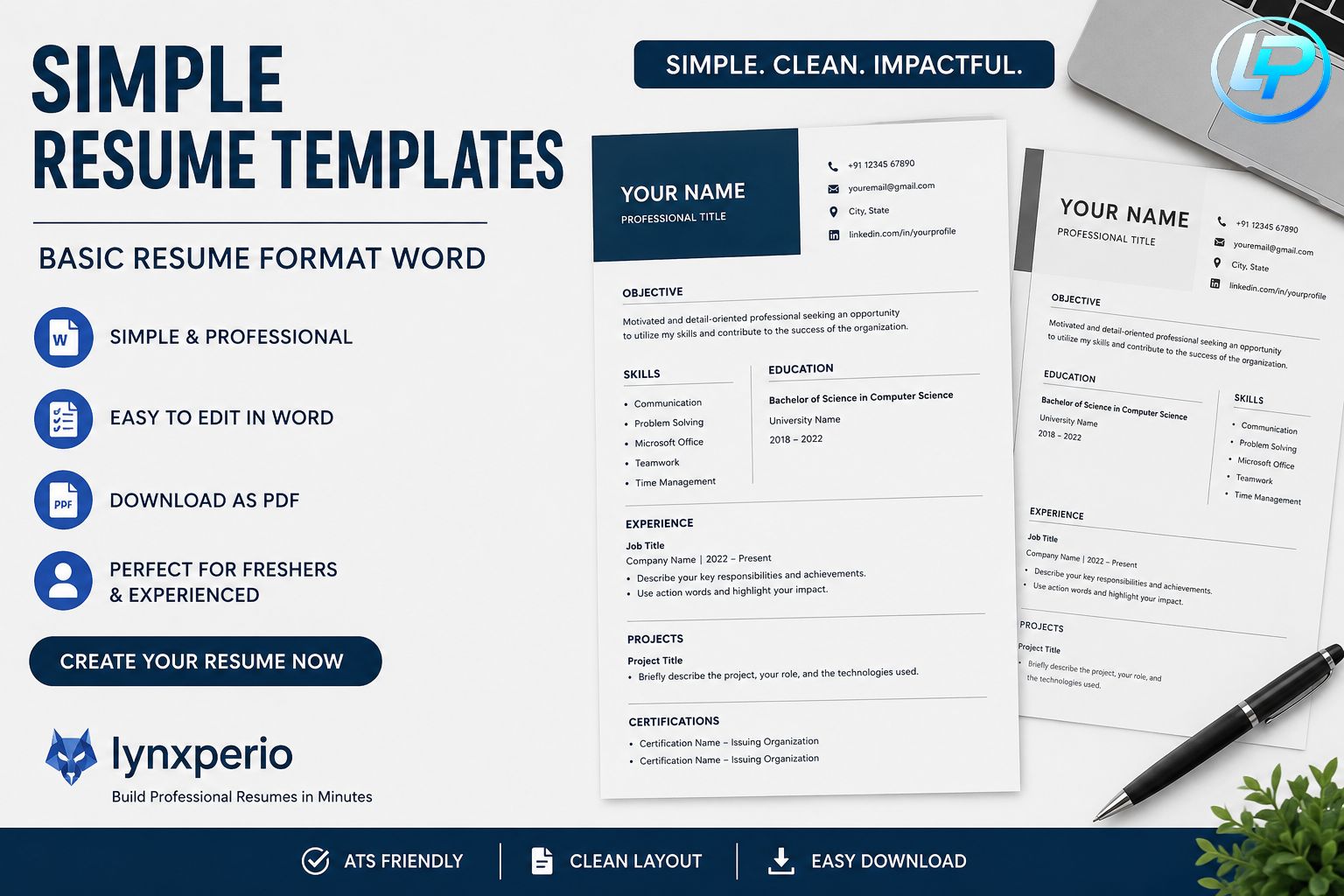
Simple resume templates are clean, minimal designs that focus on content instead of heavy graphics. They are easy to read, ATS-friendly, and perfect for freshers as well as experienced professionals.
A good simple resume format template includes:
- Clear headings
- Proper spacing
- Easy-to-read fonts
- Structured sections
Using a simple resumes style helps recruiters quickly scan your profile and understand your qualifications.
Why Use a Simple Resume Format?
A simple resume format is preferred by most hiring managers because:
- It is ATS-friendly
- It highlights skills clearly
- It avoids unnecessary design distractions
- It loads easily as a pdf resume format
Many companies use software to filter resumes, so a basic resume format in Word ensures your application gets through.
Best Simple Resume Format Word Structure
If you are creating a resume using a simple resume format Word, follow this structure:
1. Header
Include:
- Name
- Phone number
- LinkedIn (optional)
2. Objective or Summary
A short paragraph describing your goals and skills.
Example (simple sample resume):
“Motivated fresher seeking an opportunity to apply my skills in a growth-oriented company.”
3. Skills Section
Keep it concise:
- Communication
- Problem-solving
- Technical skills
4. Education
Mention:
- Degree
- College name
- Year
5. Experience (if any)
Even internships or projects count in a simple resume sample format.
Basic Resume Template Word vs PDF Resume Format
When choosing between formats:
Word Format
- Easy to edit
- Best for creating drafts
- Works well as a basic resume template Word
PDF Format
- Professional look
- Keeps formatting intact
- Preferred final version (pdf resume format)
Always create in Word, then export to PDF.
Simple Resume Sample Format (Example)
Here is a quick simple sample resume layout:
- Name & Contact
- Career Objective
- Skills
- Education
- Projects
- Experience
This format for simple resume works for almost every job role.
Tips to Make Your Simple Resume Stand Out
Even with a simplified resume template, you can stand out by:
1. Use Action Words
Instead of:
“Responsible for project”
Use:
“Led project and improved performance”
2. Keep It Short
A simple resumes format should be:
- 1 page (freshers)
- 1–2 pages (experienced)
3. Use Keywords
Include job-related keywords naturally. This improves ATS ranking.
4. Choose Clean Design
Avoid:
- Too many colors
- Fancy fonts
- Graphics
Stick to a simple resume format template.
Best Use Cases for Simple Resume Templates
A simple resume templates approach is ideal for:
- Freshers
- Students
- Developers
- Corporate roles
- Internships
If you are applying in India, a resume basic sample with minimal design works best.
Create Resume Easily with lynxperio
If you don’t want to design everything manually, tools like lynxperio make it simple.
With lynxperio, you can:
- Choose a simple resume format Word
- Edit easily online
- Download in pdf resume format
- Create resumes in minutes
It’s especially useful for beginners who want a simple resumes layout without effort.
Common Mistakes to Avoid
While using a basic resume format in Word, avoid:
- Spelling mistakes
- Too much text
- Unstructured layout
- Missing contact details
A clean simple resume sample format should be easy to scan in 5–10 seconds.
How to Choose the Right Simple Resume Format Template
When selecting a simple resume format template, consider:
- Your job role
- Industry standards
- Experience level
For example:
- Freshers → minimal design
- Developers → skill-focused resume
- Corporate roles → formal layout
Simple Resume for Freshers
Freshers should focus on:
- Skills
- Education
- Projects
A simple sample resume helps highlight potential instead of experience.
Final Thoughts
Using simple resume templates is the smartest way to create a professional CV in today’s job market. Whether you choose a basic resume template Word or export it as a pdf resume format, simplicity always wins.
A well-structured simple resume format Word ensures:
- Better readability
- Higher ATS score
- More interview chances
If you want to save time and effort, platforms like lynxperio can help you create a perfect simple resume format template in minutes.
Conclusion
A strong resume doesn’t need to be complex. By using a simple resumes approach, following a proper format for simple resume, and leveraging tools like lynxperio, you can build a professional CV that stands out.
Start with a simple resume sample format, keep it clean, and focus on your strengths — that’s the key to getting hired in 2026.